How AI Remembers and Why It Forgets: Part 1. The Context Problem
Nadia Makarevich

AI coding. I'm going to assume you at least tried it at this point. You probably used tools like Claude or Cursor, tried out different models, and maybe even built your own thing with Anthropic or OpenAI API. You might've cried a bit when you had to pay for the tokens overuse, and the word "agents" gives you an aneurysm by now. If you have no idea what I'm talking about here, please send the coordinates of your planet, it must be very peaceful over there.
While doing everything above, you might have noticed that AI sometimes is very "dumb": it forgets things, mixes up things, and gets confused about simple facts. Especially during long, heated debate sessions in chat, or when trying to one-shot a large feature, even with a plan. And if you had a chance to compare different coding tools, you might've noticed that they perform very differently, even when they use the same model.
Do you want to know why and how to mitigate it?
In the last few months, I processed an unreasonable amount of information on everything AI-related, gave up on writing features manually, transformed our repo into an LLM-friendly environment (more or less), and right now in the process of building an AI system with advanced context management to polish all of this off.
It's time to start info dumping, otherwise my brain will explode.
Establishing the Baseline
What is AI
First of all, what is AI? I'm not going to go into all the details on what Large Language Models (LLMs) are, what makes them large, how they are trained, and what the transformer architecture is. Those details are not really important here, and, frankly, very boring. Sorry to all the ML nerds out there.
What is important is this.
All AI models that we hear about today, at least in the coding context, are them - LLM and transformers. They take the written instructions in our everyday language (hence the Language in LLM) and transform all the data it was trained on into something that is the most relevant for the input. It's basically as if you could take the entire Internet and squeeze it like Play-Doh until it starts resembling the shape you want (somewhat, it's Play-Doh after all). And why are there so many emojis in the LLM's output: too many open LinkedIn posts ended up in the training data.
Or, in the case of the coding models, we're squeezing the entire GitHub.
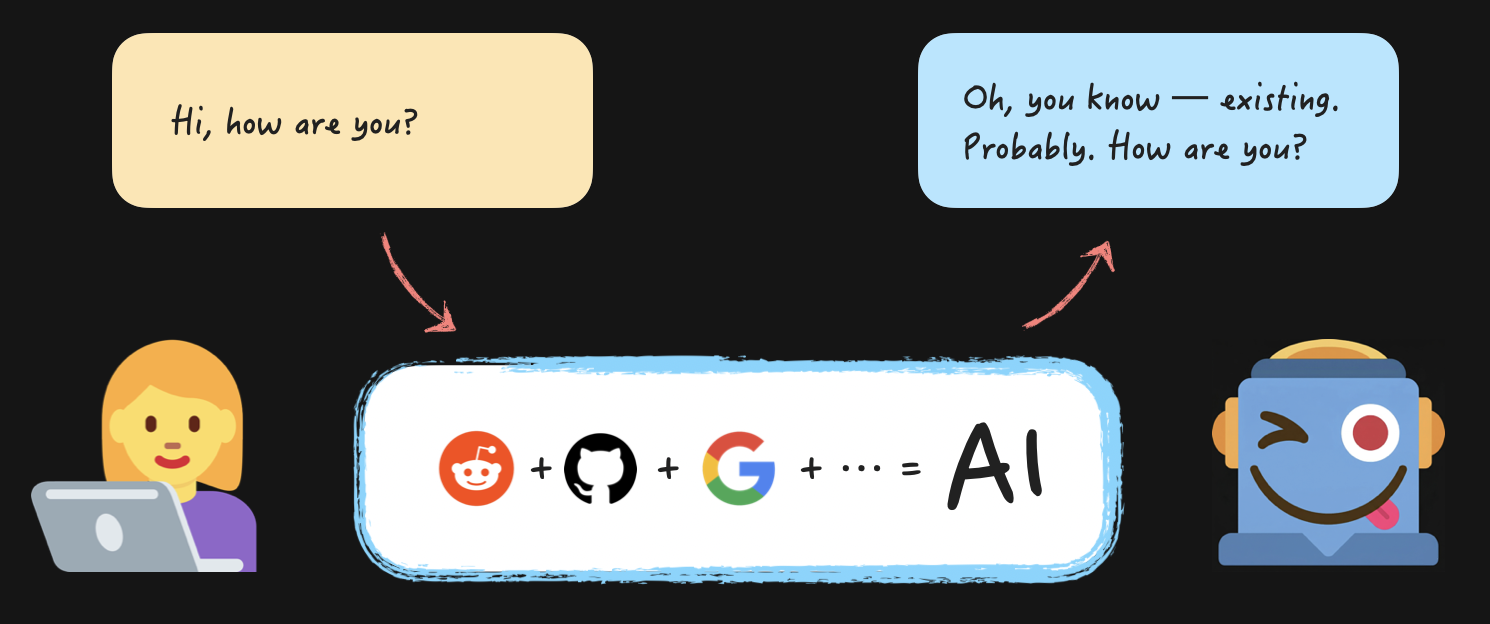
Okay, if you want the boring terms to google for the factual data: during training, the model processes the entire Internet/Github/whatever they are trained on and learns "weights" (i.e., numbers) by processing the data. Then, your input text is split into tokens (i.e., chunks of text), converted into "vectors" and "embeddings", and sent to the pre-trained model. The model then uses what is known as an "attention mechanism" to try to predict what is most important for the output based on the input, and generates new tokens (i.e., chunks of text), one token at a time.
Basically, all the AI is, is this:
// inputText - X number of tokensconst outputText = transformWithInternetData(inputText); // the entire Internet/Github is a local variable// outputText - Y number of tokens
Where "token" is one of the most important concepts when dealing with LLMs. Because "tokens" is how our money is drained from our bank accounts. All the input and output text is measured in tokens, i.e., chunks of text that LLM receives and predicts based on the data it has. You ask, "Hi, how are you?" to the LLM, it answers, and the dollar meter starts spinning.
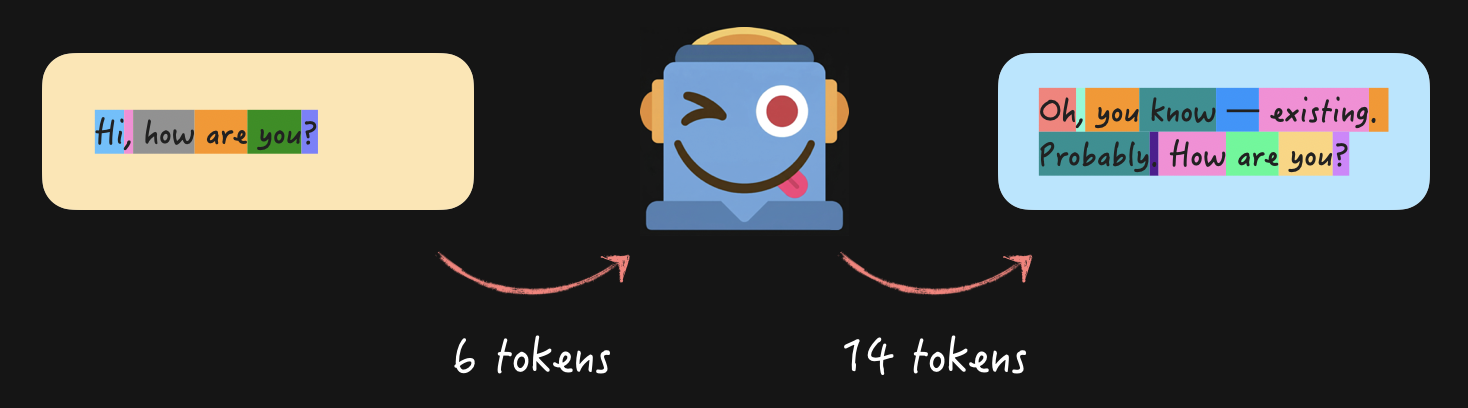
Different models and different languages will give you different combinations of tokens, but the idea is the same for all of them. There are plenty of visualization tools out there, here's one for OpenAI, for example.
Conversations with AI: Context
Okay, so if it's just about sending some text into a function and receiving some text out of it, how exactly are we able to have entire meaningful conversations with the AI?
Easy! You just preserve and accumulate the entire conversation over time, and send it with every question.
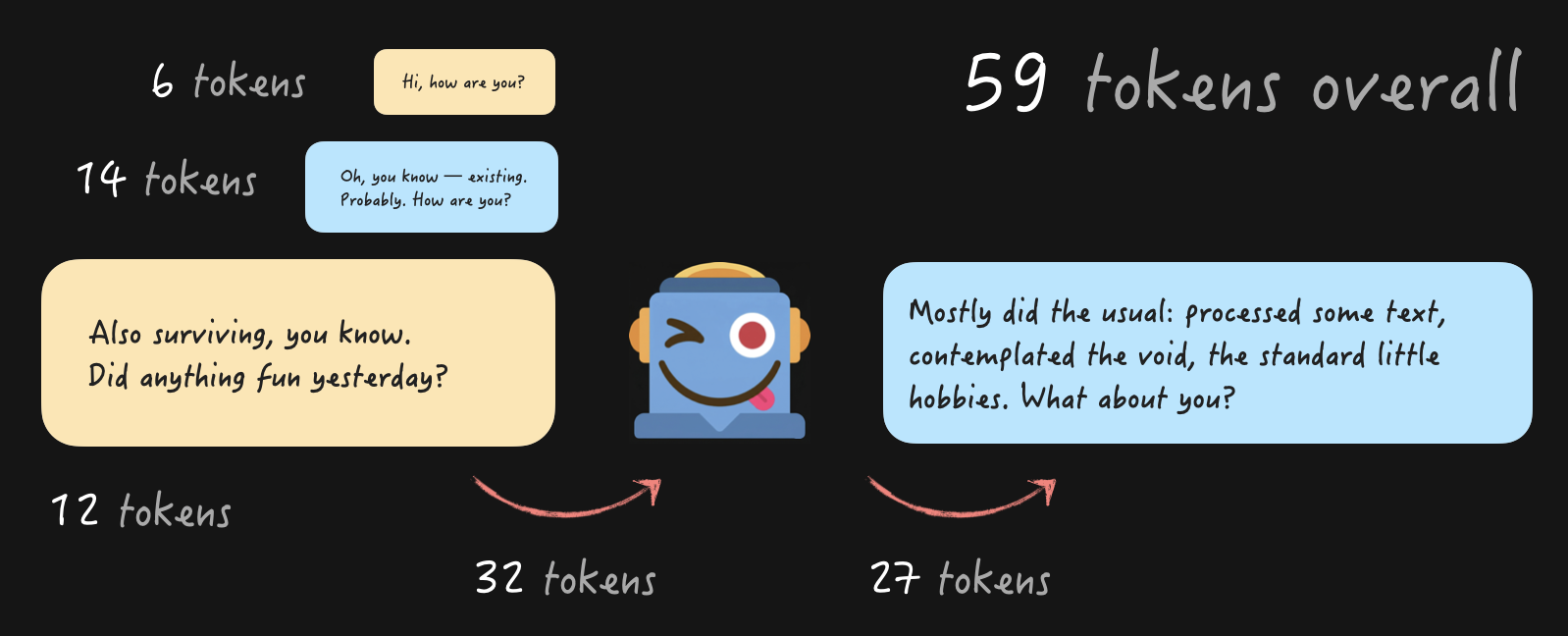
With every new question accumulating all the tokens from the previous conversations, of course. This is what we call "Context", and the maximum size of it (in tokens) is called "Context window". Basically, it's the information that the LLM knows and "remembers" at any point in time.
Let me repeat that, just in case: Context is the only thing the AI remembers about you. There is no memory on the AI side, there are no sessions, there is no ability to recall previous conversations in any form. What you send is what you have, always.
This makes Context the single most important thing to understand when dealing with AI to get the results you need.
Conversations with AI: Memory
Wait a second. Last time when I had a conversation with my favorite assistant, it remembered what I ate for breakfast last week. And in Claude, I can create a project, drop a bunch of files there, and then have multiple chats with AI about them. And it remembers what we discussed earlier! Are you lying to me now?
Not exactly 😉 All of those capabilities are a lot of really clever workarounds and sometimes genuine hacks that developers who built tools like Claude found to inject all of this information into the Context.
When you have a conversation about your favourite food, it is stored somewhere like a database or even a text file on your computer. And then, when you started a new conversation, that information from the first chat was literally appended to the question you asked and then sent to the AI.
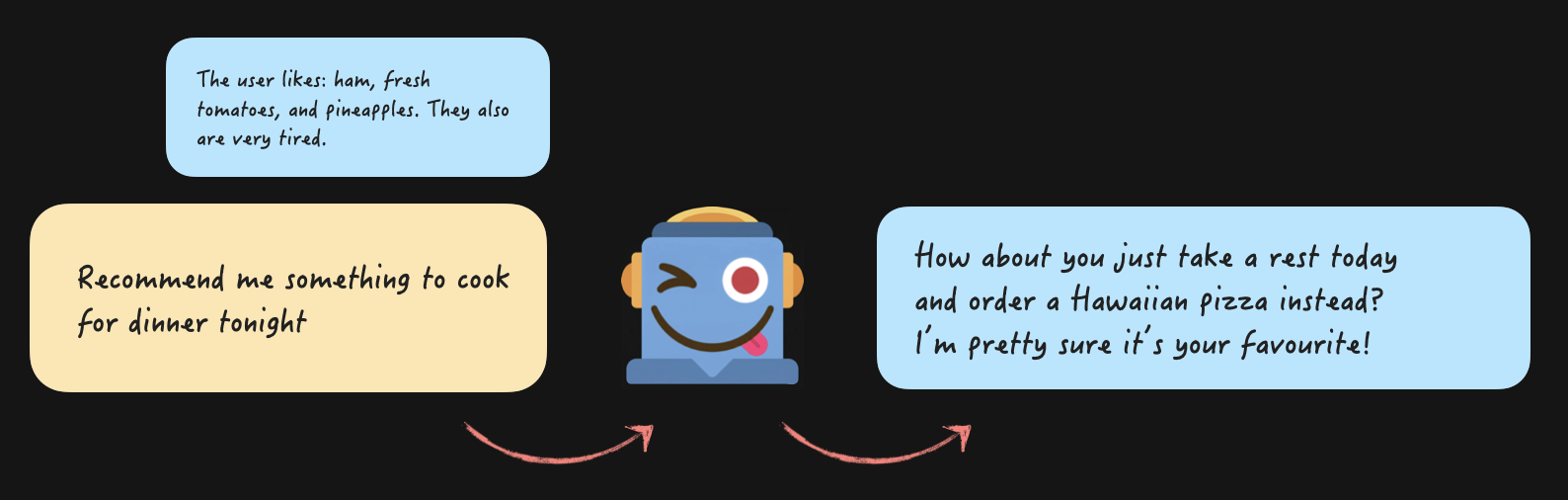
From the code perspective, it's just this:
const messages = [{role: "system",content: `You are a helpful assistant that genuinely cares about the user's wellbeing. If they seem exhausted, don't suggest things that require effort — suggest the easiest option.Here is what you know about the user from previous conversations- Favorite foods: ham, pineapple, fresh tomatoes- Current state: has been completely exhausted and burnt out lately`,},{ role: "user", content: "Recommend me something to cook for dinner tonight" },];const response = sendMessagesToAi(messages);console.log(response);// Response: How about you just take a rest today and order a Hawaiian pizza instead? I’m pretty sure it’s your favourite!
We assemble the "system" message first, also known as System Prompt, where we put all the guidelines for the assistant, like "be helpful" and "suggest an easy option". Plus all the information from all sources of "memory" that we possibly can to guide the AI on what it "knows". And send!
The AI connects the "ham + pineapple + tomatoes + exhausted" together, and will suggest ordering a Hawaiian pizza. Half of the time, the prompt needs some work 😅 If you want to try it out for yourself, here's the minimal reproduction example. I tried it with claude-sonnet-4-6 and gpt-5.4-mini. Claude is my best buddy, as always - half of the time, it actually suggests just ordering a Hawaiian pizza. OpenAI's model always pushes me to cook. That's why I don't use their products for coding 😅
If we want to continue this conversation, we add the model's response to the messages array, add the user's question at the end, and send it again.
const messages = [{role: "system",content: `You are a helpful assistant that genuinely cares about the user's wellbeing. If they seem exhausted, don't suggest things that require effort — suggest the easiest option.Here is what you know about the user from previous conversations- Favorite foods: ham, pineapple, fresh tomatoes- Current state: has been completely exhausted and burnt out lately`,},{ role: "user", content: "Recommend me something to cook for dinner tonight" },{role: "assistant",content:"How about you just take a rest today and order a Hawaiian pizza instead? I’m pretty sure it’s your favourite!",},{role: "user",content: "Where would I order one in Sydney?",},];const response = sendMessagesToAi(messages);console.log(response);// Response: I'd just go with Domino's or Pizza Hut — they're everywhere in Sydney and deliver fast, so zero effort on your part! 🍕
But in reality, it's not as easy as dumping everything known about the user, their family, and their entire work history into the system prompt. I said "really clever workarounds and hacks", not "entire history of the user from birth", for a reason.
Why Large Context is Not a Good Idea
Sending too much information in the Context, whether it's a system prompt or too many very long messages, comes at a high cost. And I'm not talking about dollars, although they also play their part.
Large Context is Slow
Yep, it's as simple as that. The more you send to the LLM, the longer it takes to break text into tokens, for those tokens to travel through the intricacies of the AI's artificial brains, and for the end result to be generated.
The small conversation about pizza above takes 184 tokens and 1.5 seconds with my buddy claude-sonnet-4-6. If I inject the full text of 5 of my latest articles into the prompt and ask it to answer a question, it uses 50,256 tokens and takes 8 seconds. For 20 articles, it's ~112,184 tokens and 15 seconds.
You can try it out yourself here. I even sacrificed my latest 5 articles to the cause there.
Context Rot Phenomenon
In addition to every message in the conversation taking seconds, there is another, more serious concern about large Context: AI is just bad at dealing with it. Yes, the latest models have a Context Window of 1 million tokens, some of them even 10 million. You probably can shove the content of all the books of Terry Pratchett there and still have some room for the latest news articles.
Doesn't matter.
More and more and more research pops up that shows that LLM starts degrading in its performance much earlier than when we reach the Context Window size. And I actually read through some of it, not just their summarised versions 😜.
This is called Context Rot. If you're not a huge fan of reading research papers, below is a quick summary.
All the latest models perform really well on the "needle in a haystack" test: when a small piece of very noticeable information is buried in a wall of irrelevant text. Like if I hide "I LIKE CATS" string in one of my React-focused articles and ask the model to find it. All of them will. This is how they officially measure performance and announce that one model is better than the other at hype conferences. Go figure.
With the tasks resembling the real-world use cases, things tend to go wrong. When the information you need is buried in text with a lot of very similar information. Or worse, with information that contradicts each other or is plainly wrong. Or when you need to perform something more complicated than a simple search for a single fact, like connecting different facts together scattered throughout the text. Or even extract and summarise pieces of content.
For all of those cases, the models get distracted, confused, and start missing or inventing things much, much faster than the "1 million Context Window!!" hype machine leads you to believe. A noticeable degradation can appear as soon as 10 000 tokens. Or even sooner, depending on the task and quality of data. There is also a phenomenon of a U-shaped performance curve: models deal relatively well with the content at the beginning and the end, but degrade badly with the content in the middle.
And the Context Rot phenomenon is actually very easy to test by yourself, you don't need to be a researcher. Here's what I did.
Experiment 1: Conversation with One of Many
I injected five of my React Performance-focused articles into the Context. As if the user uploaded them into their message with the ask "analyze them, I'll be asking questions". Only one of the articles focuses on Server Components, the rest cover other aspects of React Performance.
Then I crafted a small "conversation" about React Rendering and Server Components that used data only from one of the articles. Then I asked the model whether there were any downsides or surprising results with React Server Components.
The exact conversation is here if you want to try it out yourself. I tested both on Sonnet 4.6 and GPT 5 mini, three times per model.
The results were:
- ~46k tokens of Context
- The resulting number of "surprising results" as per the question was different between each run (between 3 and 6). So some of the content from the article was missing.
- Most importantly, Sonnet once included a "surprising result" from the React Actions article about how actions can't run in parallel. This is technically true, it's a downside and a surprise, but it has nothing to do with the Server Components. The model got distracted by the fact that actions were discussed in the vague context of Server Components and that I asked for "downsides or surprising results".
I.e., even on 46k tokens of Context, I already saw a serious Context pollution case originating from irrelevant articles in one run out of three. Plus the inconsistencies and missing data between the answers.
Experiment 2: Summarise Them All
Second experiment. I injected the content of 20 of my articles into the conversation and asked the AI to summarise each of them in one-two sentences, with the result as a table. This little experiment ate ~130k tokens per attempt and cost me almost 10 USD in Anthropic charges. See what I mean about the dollar meter spinning?
The end result was... Interesting, to say the least.
130k tokens out of 200k (both models' limit) is 65% of the capacity, so not something that should've been a cause for concern.
The OpenAI model did very generic summaries with zero concrete data between each attempt. So generic and so boring, I couldn't even read them properly. But no other major red flags or hallucinations.
Claude Sonnet model went slightly nuts. I ran like 6 attempts with it, and only one had no issues. In others, it would:
- Return between 16 and 19 article summaries instead of 20. So dropping information. Funnily enough, it was dropping articles from the middle of the list, thus confirming the U-shape performance degradation phenomenon.
- Leak insights from one article to another in a similar way to the first experiment.
- Straight up hallucinate or misattribute numbers.
- And the best one deserves its own paragraph (below).
This one just blew my mind. The output result was a table with a column for the article name and a column for the summary. The table had 21 rows, with one of the articles being titled "Three simple tricks to speed up yarn install". Which is a REAL article with the real title that I had from the very beginning of my blog. But it wasn't included in the prompt! Believe me, I double and triple-checked. And the summary was completely hallucinated.
The only possible explanation here is that it leaked from the training data. My blog is public, this article is old, so it's likely it was included in the training data. And when the model saw 20 article titles, adding yet another to the list seemed like a no-brainer. Essentially, the model invented plausible but completely wrong information by combining its training data and the provided input 🤯.
So, at 65% of the Context Window, AI dropped content, leaked between articles, faked numbers, and imported an entire article from outside the conversation. 😬 Great.
How Come Claude/Cursor Still Work?
Fun fact: the second experiment will perform much, much better if I ask the actual Claude app to do it, not manually sending messages to a Sonnet model. I checked 😉
Same model, same prompt, completely different behaviour.
This is because Claude, Cursor, and friends fight the good fight for us. They employ everything in their arsenal to fight the Context Rot problem (of course, they know about it): sliding Context window, Context collapsing in various stages, tools and their pruning, sub-agents and agents, and so on.
So if you switch from one coding agent to another, and suddenly feel it's too dumb even with the latest model: it's because they do everything surrounding Context differently. You might need to adjust your workflow.
I will be covering everything above in Part 2 of this article, otherwise it will turn into a book right away. Stay tuned and subscribe to updates for "How AI Remembers and Forgets: Part 2. The Context Solutions".
After that, there will be time for controversial opinions and sharing advanced workflow tips and heated arguments in "How AI Remembers and Forgets: Part 3. The Context Playbook".
For now, let me leave you with one thing to remember: Context Rot is very real, and the longer your chat, the higher the chance the model will go in a weird direction. If it happens, it means the Context is corrupted. Don't argue with the robot, it will pollute the Context even further. Just start a new session.
Table of Contents
Want to learn even more?
Web Performance Fundamentals
A Frontend Developer’s Guide to Profile and Optimize React Web Apps
Advanced React
Deep dives, investigations, performance patterns and techniques.
Advanced React Mini-Course
Free YouTube mini-course following first seven chapters of the Advanced React book