Can You Fetch Data with React Server Actions?
Nadia Makarevich

Can we use React Server Actions (now known as Server Functions) for data fetching? That's a very good question that pops up from time to time. But is it really a good idea to fetch data with Server Actions? "Actions" kinda imply that they are not for fetching. Why would anyone even consider it?
Let's find out! We'll start by understanding what they are in the first place, move to the pros and cons, and finish with a definitive answer to that question. For real this time, not the usual "it depends", I promise!
Oh, and just in case: we're talking only about fetching on the client here. For Server Components, you don't need Actions to fetch data. You can just import functions directly right away.
The repo with examples to follow along is here.
What Are React Actions (Server Functions)
Let's start with what those Actions are, to make sure we're on the same page.
Server Functions (renamed from Server Actions in 2024) are a relatively new React feature that allows developers to call backend code from frontend components. Not via boring GET/POST requests, but directly, as a function that you import.
It would typically be something like this. First, you create Server Actions:
// FILE: action.tsx'use server';export const saveSomething = async (data: string) => {console.log('SERVER: Action received with data:', data);return { success: true };};
Which is just a file with 'use server' at the top, and every available action is just an export from this file. Everything inside is server code.
Then, inside your client component with interactivity, you'd call this action like a normal import:
// FILE: submit-button.tsx'use client';// Just import that backend action like a normal importimport { saveSomething } from './action';import { Button } from '@/components/ui/button';export const ClientButton = () => {// Standard React onClick hereconst onClick = async () => {// call the action like a normal function and get the resultconst result = await saveSomething('Some data from client');console.log('CLIENT: Action result:', result);};return <Button onClick={onClick}>Click Me to save data</Button>;};
And that's it. Now your button can trigger things on the server directly.
Whether it's a good idea to write your backend with React like that or not is a completely different and potentially heated discussion. For today, let's focus on how this magic works.
If you haven't downloaded the repo with the examples yet, now would be the time. You need src/app/simple-action-example folder. Start the code in dev mode, open the /simple-action-example URL, and you'll see exactly the same button.
Open Chrome's Console and click the button a few times. You'll see this:
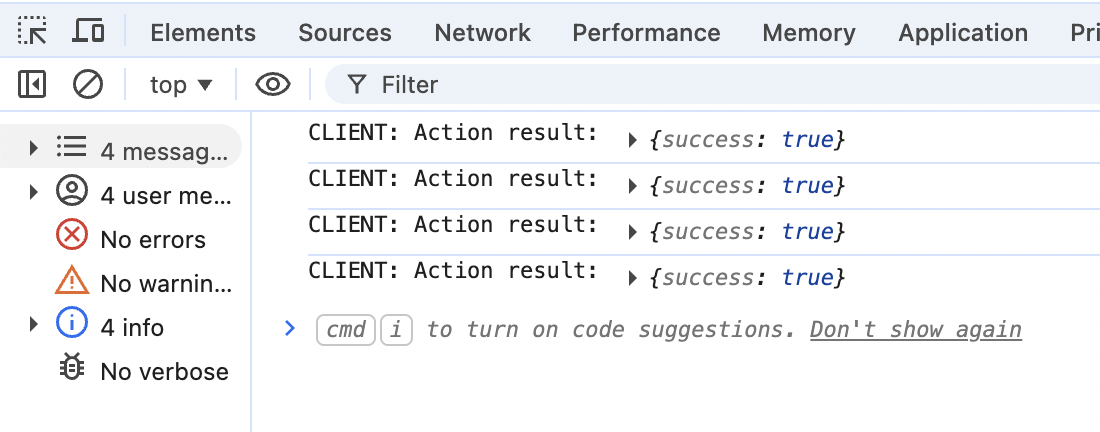 Only the "client" log shows up here. Open the terminal window with the server logs, and you should see this:
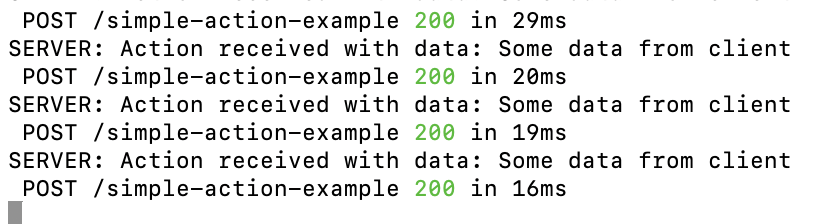
The "server" part is here. This is kinda cool. The code feels clean, and most importantly, we have total type safety here, with all its benefits like confidence in data and autocomplete in your IDE.
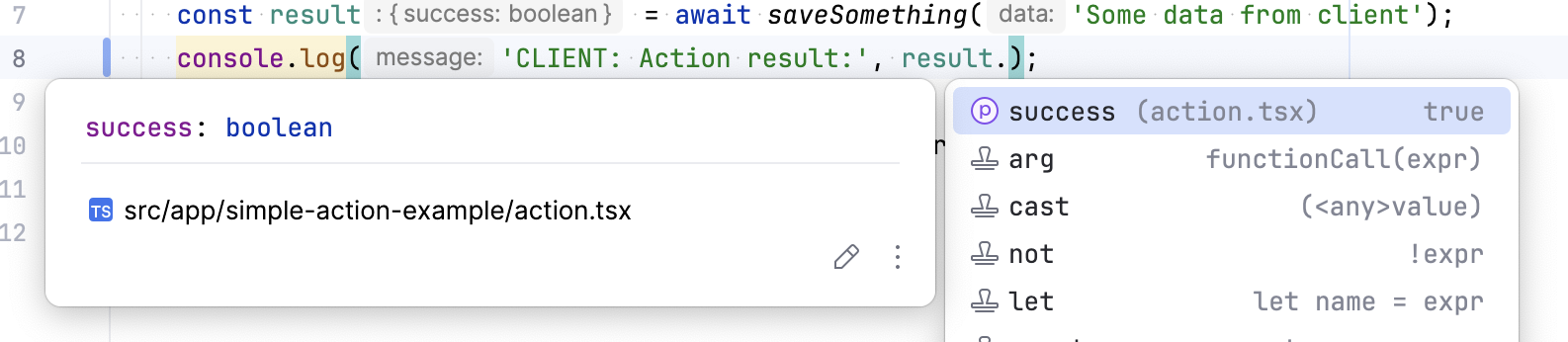
There is also one important thing here that should immediately catch your eye. No, not the fact that I hate dark mode 😅. This one:
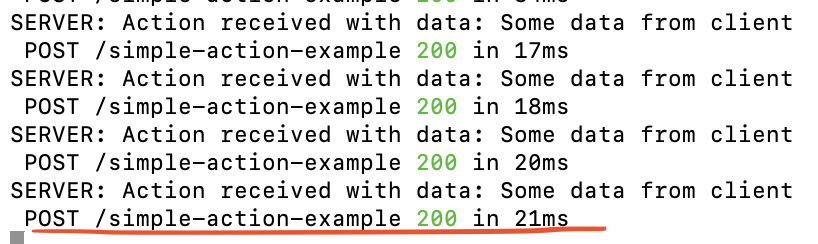
Along with our "server" logs, I can see a POST request with the URL that triggered the Action call. If I open the Network panel, it confirms it:
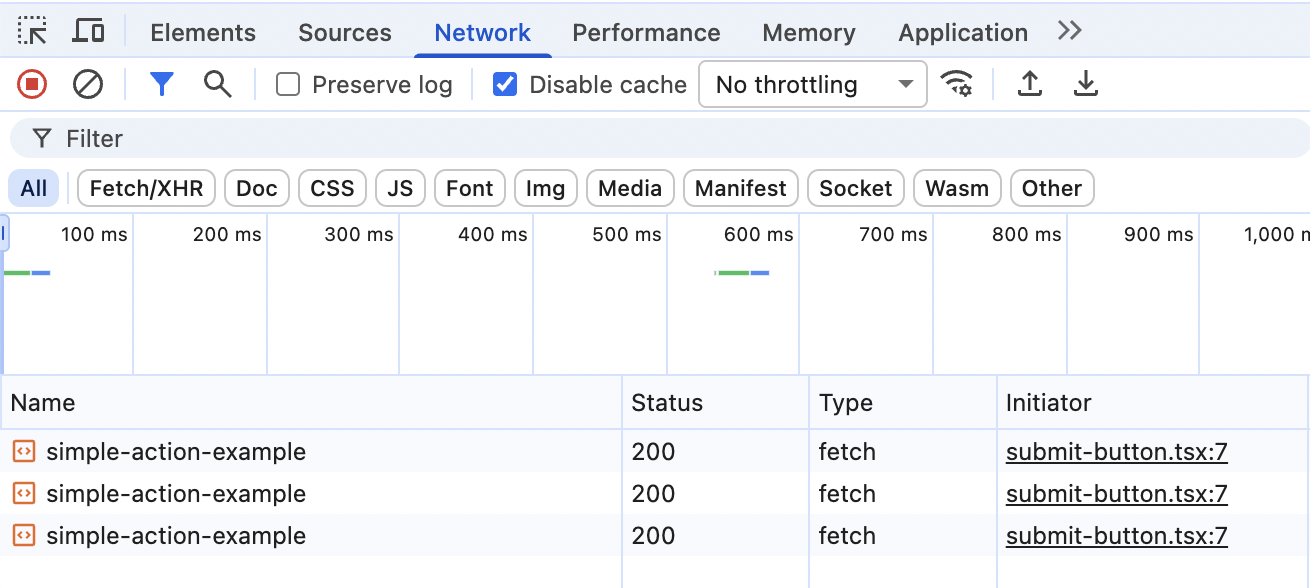 There is no magic, yet again.
Our Actions are nothing more than POST requests. If you click any of them, you'll see your exact payload that we send as an argument to the saveSomething function.
 And clicking on Response will give you a slightly visually malformed but exactly the same response that we log on the client:
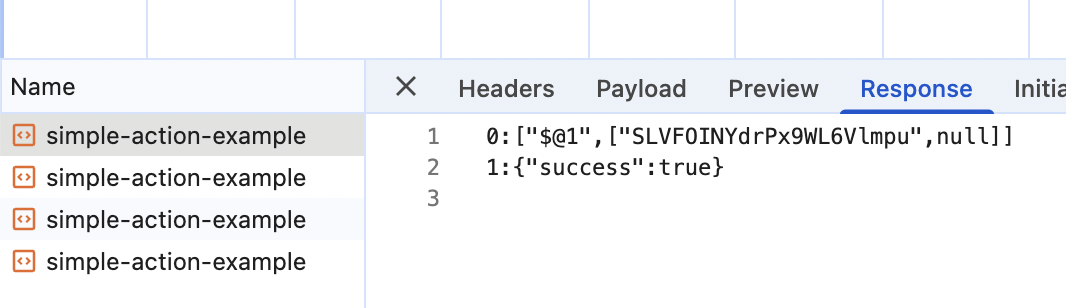 This response is what is known as a React Server Components (RSC) payload. And its format is completely irrelevant here. The important thing is that I was able to
 console.log it as if it were just normal typed data returned by a function.
// I can just console.log "result.success" as if it's a normal importconst onClick = async () => {const result = await saveSomething('Some data from client');// completely type safeconsole.log('CLIENT: Action result:', result.success);};
This is really cool, not gonna lie.
React Server Actions for Data Fetching: How and Why
Okay, we just discovered that Server Actions are essentially nothing more than a fancy wrapper around POST requests.
Here's a question for you. Considering that we can safely read the response, what exactly is stopping me from using that fancy wrapper to fetch data? Can I do this?
useEffect(() => {const fetchProducts = async () => {// can this be a Server Action?const data = await getProducts();setProducts(data);setLoading(false);};fetchProducts();}, []);
The answer, as you probably have guessed already, is of course I can.
Yes, it will be a POST endpoint underneath, but so what? GraphQL has used POST requests to fetch data for years now, and they were considered a data-fetching silver bullet for quite some time.
And consider the benefits!
No more manual JSON.parse(). No more trying to bring some typing sense to the responses with Zod. Always know what data is available on the backend via IDE autocomplete!
More importantly, if you already use Actions to manipulate the data, it makes zero sense to create "traditional" complicated endpoints to fetch data.
Those are actually all the benefits that I know of. But the experience is definitely nicer, and if the cost is just a POST request instead of a GET, why not?
Common Arguments Against Actions for Data Fetching
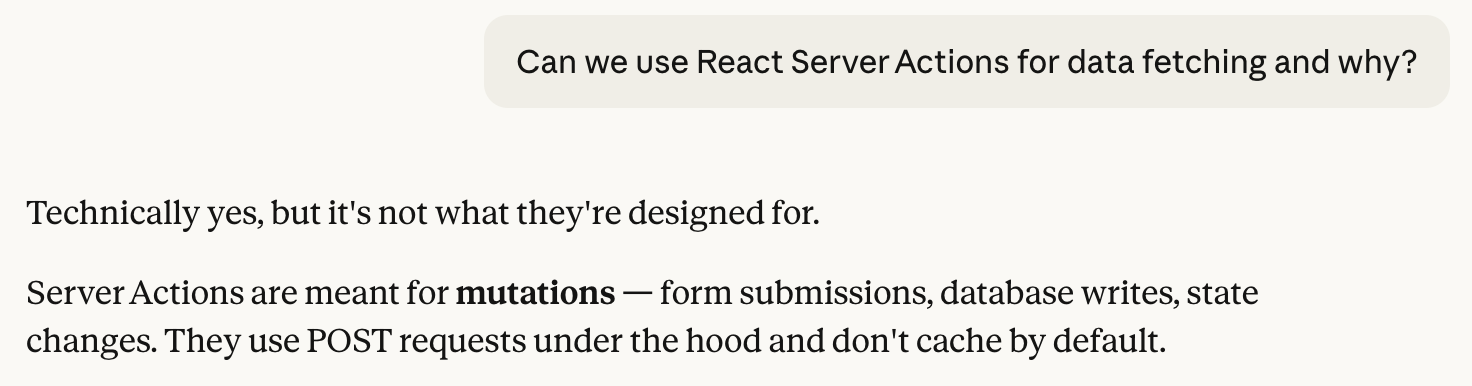
Okay, so what are the arguments against Actions for data fetching? The most common one is "they are not designed for it". If I ask my good friend Claude this question, this is the very first response, which kinda proves that it is indeed the most common one.
Other common points that you'll often see on the internet and your chatty friends' responses:
- No caching via HTTP headers since it's POST, unlike GET.
- No request memoization, unlike fetch.
Let's go through them one by one.
Actions are not designed for data fetching
The "they are not designed for it" argument is not even an argument. It's a religious and philosophical debate. You can't win those. And in my mind, if POST requests are good enough for the entire GraphQL ecosystem and frameworks like Apollo, it's good enough for me. From a philosophical point of view, of course.
So if this "conceptual" argument is the only objection against Actions, I'd use them in a heartbeat. I'm very pragmatic these days.
No caching via HTTP headers
This is indeed true. Most (if not all) browsers don't cache POST requests, even if the correct headers are set. A few good experiments are described here, if you want to verify for yourself.
However!
This only applies to browsers and CDNs. They are the ones that rely on Cache-Control headers for caching behavior. So if your data requests are not supposed to be stored there, you won't care about those. This will be the case for most requests behind a login page, for example. And any type of caching that caches the data itself, not the requests, like client-side caching, is totally fine.
No request memoization
Oh, this is a fun one! Because technically this is true, but it's completely irrelevant here.
Because we're discussing client-side fetching here, and request memoization is a server feature. No one was going to memoize your fetch requests in useEffect, unless you use some nice data fetching library that explicitly caches data on the client.
And if you use some nice data fetching library, caching will happen regardless of whether it's an Action or a fetch. It will just store the data returned in memory according to its own rules.
So, using Actions instead of traditional fetch is identical from that point of view.
Let's Try Actions on a Larger App
Okay, let's assume I'm developing an app behind a Login page, and want to do client-side data fetching. In this case, my only argument against using Server Actions instead of fetch is the "conceptual" one, with no practical downsides?
Ha! I'm going to use them tomorrow in this case. Only benefits and no drawbacks.
But since we gathered here today to compare and investigate stuff, let's play a performance detective 🕵🏻♀️ once more.
For this investigation, I implemented a "Dashboard" app that fetches data for each of its blocks from REST endpoints. It's pretty nice:
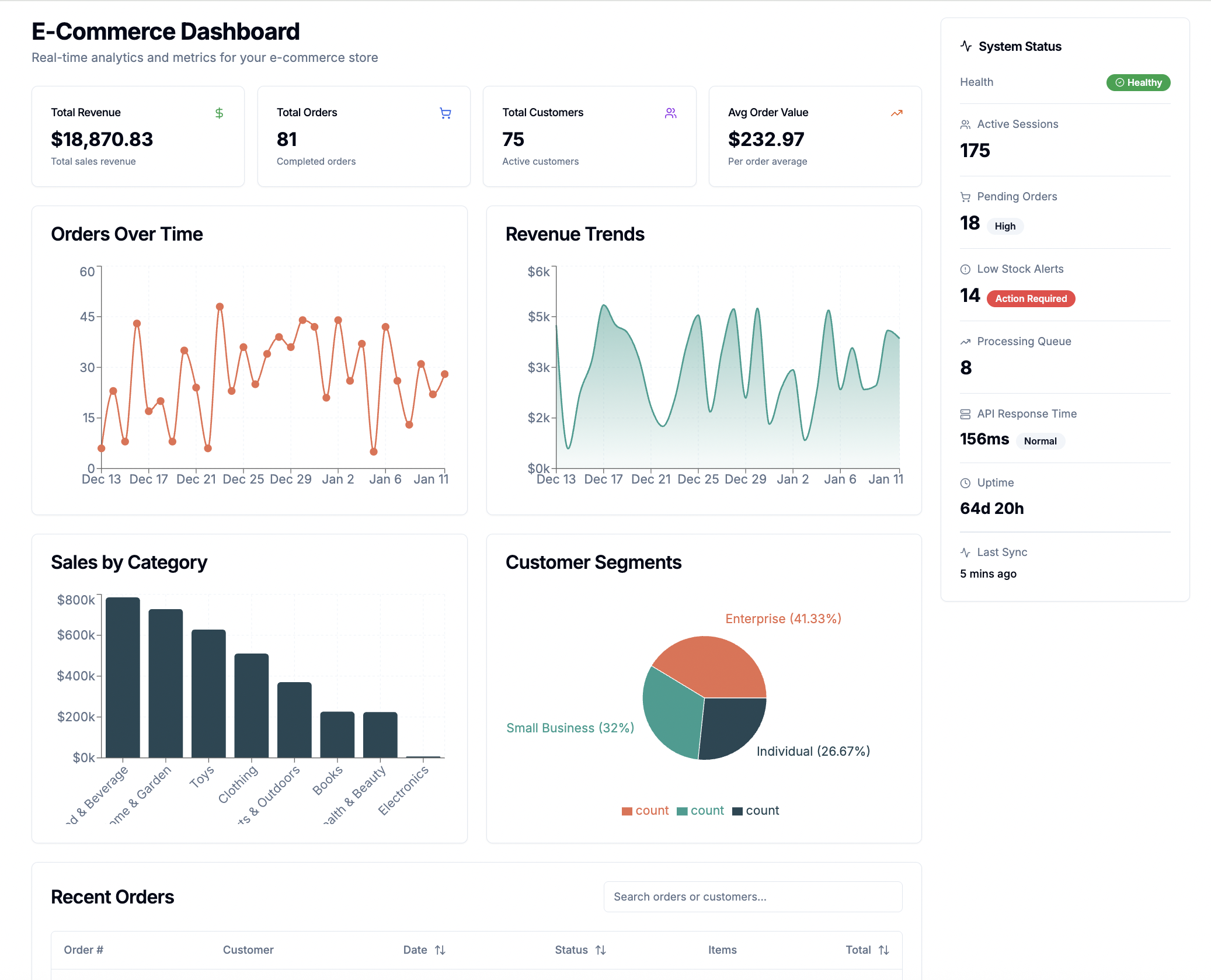
There are seven REST endpoints in total:
- Summary endpoint that fetches data for the top row of the cards.
- Three endpoints that fetch data for the four charts (don't ask why three).
- Two endpoints for two tables under the charts.
- One endpoint to fetch the "status" data on the right.
All of them are implemented with TanStack Query to make it fancy and closer to how I would actually do things.
The app itself is pretty much this:
<><DashboardHeader /><MetricsCards /><DashboardGrid><OrdersLineChart /><RevenueAreaChart /><SalesByProductBarChart /><CustomerDistributionPie /><OrdersTable /><ProductsTable /></DashboardGrid></div>{/* Right Sidebar */}<div className="flex-shrink-0"><StatusSidebar /></div>
Where each of the components that need remote data has something like this:
export function OrdersLineChart() {const { data, isLoading, error } = useQuery({queryKey: ['time-series'],queryFn: fetchData,})if (isLoading) return <OrdersLineChartLoading />;if (error) return <OrdersLineChartErrorComponent />;// data goes herereturn <Card>...</Card>
Where the fetchData function is where the actual fetch happens:
async function fetchData() {const response = await fetch('/api/time-series');const data = await response.json();// validating response data with zodreturn TimeSeriesDataArraySchema.parse(data);}
I even validate all the responses with Zod since type safety is a big topic here today.
In the repo with study examples you need the root page.tsx component (src/app/page.tsx) and then trace the implementation from there.
For this experiment, I'm interested in the Initial Load for first-time visitors, i.e., no cache. I want to measure the LCP number, which stands for "Largest Contentful Paint," and happens to correspond to when the main title of the page is visible. And I'm interested in when all the data is visible as well, i.e., when the last data fetch is finished.
And finally, if you want to reproduce the numbers and you use Chrome, you need Caddy to imitate HTTP/2 for parallel requests. It's because Chrome has a limit on parallel connections with HTTP/1, which is just 6.
If you have no idea about any of this and how to measure it, I have a bunch of detailed articles on the topic and even a book called "Web Performance Fundamentals" that focuses exclusively on that.
Here is how the performance picture looks like with 4G Internet throttling:
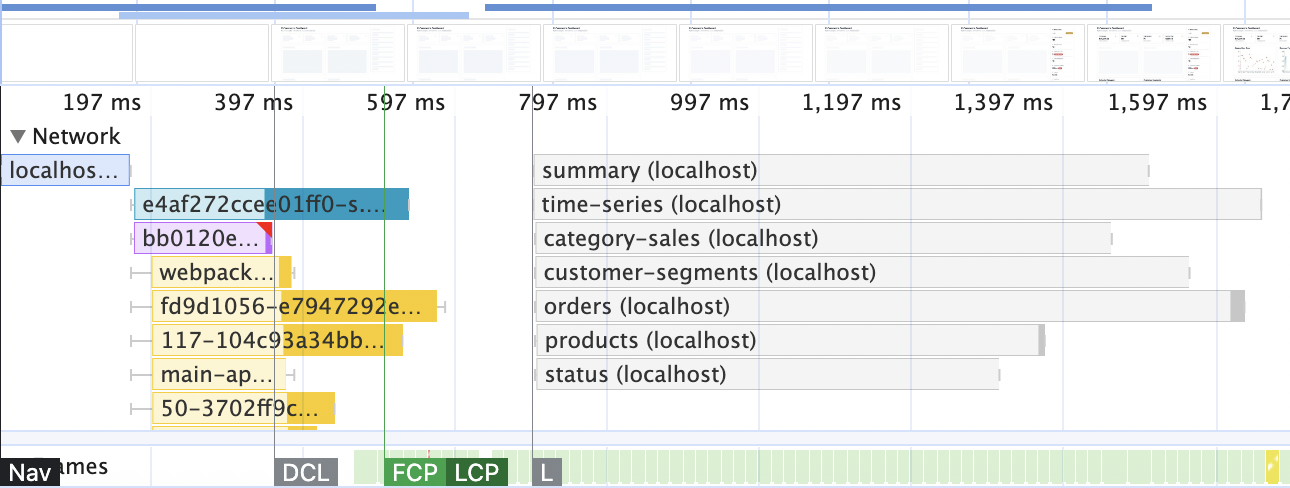
This is typical client-side data fetching: we have some JavaScript downloaded first, then some requests are triggered (by TanStack inside React in our case), and we're staring at the loading skeletons for some time until the data comes through.
The numbers I'm interested in look like this:
| Simple fetch | |
|---|---|
| LCP (title is visible) | 500ms |
| All data is visible | 1.7s |
To measure the impact of actions (if any), all I need to do is replace the content of all fetchData functions. I need to get rid of the fetch and Zod here:
async function fetchData() {const response = await fetch('/api/time-series');const data = await response.json();// validating response data with zodreturn TimeSeriesDataArraySchema.parse(data);}
And replace them all with a single function call like this:
import { getTimeSeriesData } from '@/actions/timeSeries';async function fetchData() {return getTimeSeriesData();}
Next.js will take care of transforming those calls into actions, TanStack will take care of the client-side caching, and Actions will take care of the typing. In the study examples repo, open the src/queries folder, and inside every query get rid of everything fetch-related and uncomment the needed action.
Okay, replacing everything, rebuilding the website (remember to always measure performance on production build!), and here's the final recording.

Huh. 🤔
What. Is. That? 😱
All the parallel requests turned into a sequence? 🤔 That's not good, to say the least. The numbers to compare, for the fun of it:
| Simple fetch | Fetch via Actions | |
|---|---|---|
| LCP (title is visible) | 500ms | 500ms |
| All data is visible | 1.7s | 8s |
Why would your regular POST requests turn into this weird thing? Surely it's a bug!
Nope. And it's actually documented behaviour, if you read React documentation carefully. Very, very carefully. Hidden inside use server documentation among all the other caveats you can find this: "Accordingly, frameworks implementing Server Functions typically process one action at a time..."
In the framework's documentation, it's also clearly documented, inside a small "Good to know block" in the middle of the "Updating data" page.
That's why Server Actions are "not designed" for data fetching! Good to know.
Another caveat of using Actions for data fetching is debugging. If you look closely at your Network panel, you'll see a bunch of calls to the localhost endpoint. All of those data fetches are named the same! It's visible on the screenshot above, too. In combination with a malformed RFC format in the Response tab, it's a pretty miserable debugging experience.
But We Should Use Server Components for Data Fetching Anyway!
There's a strong opinion in some parts of the React community, that data fetching on the client is gone and that we should always use Server Components for that.
Well, here's my strong opinion to address the inevitable flurry of comments on that topic: we absolutely should not.
I assure you, client-side fetching is not going anywhere anytime soon. There are like one thousand and one reasons to prefer it over Server Components.
What we should do is learn the fundamentals: how Server-Side Rendering (SSR) works, what the difference is between SSR and Server Components, how to fetch data with all those in mind, and why. How to measure all of this also wouldn't hurt. And you need to have a few good tools in your arsenal for data fetching, of course.
Because in this case, you'll know with facts and numbers what exactly introducing SSR and/or Server Components for data fetching could give and what it will ask in return. For this particular app, for example, introducing SSR improves the overall score at no cost and gets rid of loading skeletons. But it will make LCP twice as bad. Rewriting it with Server Components will take more refactoring, could improve performance in comparison, but loading skeletons will be back, and the app will be much harder to maintain and understand.
If I do exactly that, the numbers will be these by the way, if you want to investigate different rendering some more:
| Simple fetch | Fetch via Actions | SSR | Server Components | |
|---|---|---|---|---|
| LCP (title is visible) | 500ms | 500ms | 1.3s | 520ms |
| All data is visible | 1.7s | 8s | 1.3s | 1.2s |
You'd need the /dashboard-with-ssr route and the /dashboard-with-server-components route in the example repo.
In the meantime, let's close the Actions for Data Fetching investigation.
TL;DR
Technically, yes, it's possible to fetch data on the client with React Server Actions.
But for the love of all that is holy to you, don't do that. You'll regret it the second you'd need to send a few requests in parallel. Or debug the returned data.
Use good simple REST requests in combination with TanStack Query (or any similar library) if you need to fetch data on the client.
Table of Contents
Want to learn even more?
Web Performance Fundamentals
A Frontend Developer’s Guide to Profile and Optimize React Web Apps

Advanced React
Deep dives, investigations, performance patterns and techniques.
Advanced React Mini-Course
Free YouTube mini-course following first seven chapters of the Advanced React book