How AI Remembers and Why It Forgets: Part 2. Tools and Agents
What are AI tools and agents really, and how do they keep Context in check? Let's poke around Claude Code, do a few experiments, and find out!

Table of contents
In part 1 of this series How AI Remembers and Why It Forgets: Part 1. The Context Problem, we determined that there is no such thing as AI "memory", the apparent AI brilliance is nothing more than sending the entire conversation back and forth til the end of time (or tokens), and Context rot is real and indeed smells badly.
I also promised to tell you how modern tools like Claude/Codex/etc try to solve it. Not going to do that today. Well, partially. First, we need to cover a few more things that pollute our poor Context window and understand on a deep level what tools and agents are and how they are tied together in an agentic loop. A very large part of keeping Context in check is controlling those two.
Prepare your favorite smart coding harness and let's experiment! I used Claude Code, but any of them would do, as long as they give you access to tools and allow a peek into Context. Also, if you want to play around with everything described in an isolated environment, I implemented stuff for you.
Context Experiment
In the previous article, in the first experiment, I sent the AI five of my performance-related articles as a text message (literally injected files' content into the message itself) and asked questions about React Server Components. This cost me around 46k tokens, since all five articles were injected into the Context.
But most of us are not going to do that manually. Smart tools like Claude were invented exactly so we don't have to do the terrible manual labor of coding anymore. So, how would we do that there?
There are at least two ways to do this.
Attaching Files to the Message
First, I can "attach" those articles as files and ask my question right away.
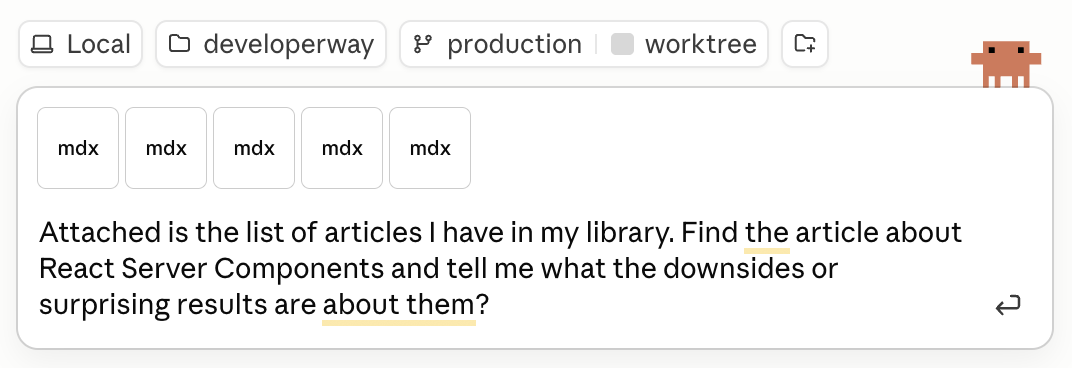
I ran it on the latest Opus 4.7 1M rather than Sonnet this time, so the actual answer was pretty good, although very wordy and full of condescending attitude.
The tokens consumption looked like this:
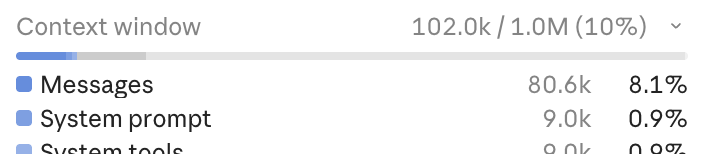
80k tokens attributed to the Messages themselves are clearly those articles embedded into Context, exactly the same as my manual experiment! With a small overhead addition of 36k tokens on top of my manual 46k, which Claude adds to justify being smarter and less prone to hallucinations than my scrappy weekend implementation.
But regardless of the precise number, Context Rot can start very early for complex tasks, so even 80k could be too much. Especially if I used something more cheerful and down-to-earth in terms of attitude and context window than the latest Opus.
Basically, embedding files like that in numbers, although very simple, is far from optimal for almost any task. There is a better way.
Reading From Filesystem
Another way to do it is to ask it to read those articles from the file system rather than attaching them directly to the message.
The prompt stays the same, only instead of attaching articles, I list them as paths to files on my laptop:
Below is the list of articles I have in my library. Find the article about React Server Components and tell me what the downsides or surprising results are about them?

List:
blog/posts/40:initial-load-performance.mdx
blog/posts/41:client-side-rendering-flame-graph.mdx
blog/posts/42:ssr-deep-dive-for-react-developers.mdx
blog/posts/46:react-server-components-performance.mdx
blog/posts/48:server-actions-for-data-fetching.mdx
A few things changed here.
First of all, the Context usage shrank: from ~80k to 34k for messages. So only one article was embedded in the Context this time. Yay for fewer tokens and less Context rot!
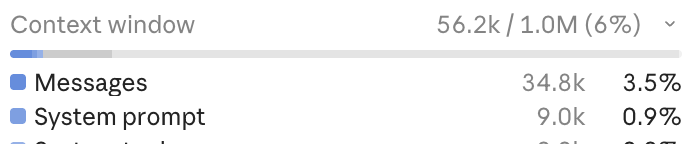
And second, a mysterious "Read" thing happened before the AI produced the answer.
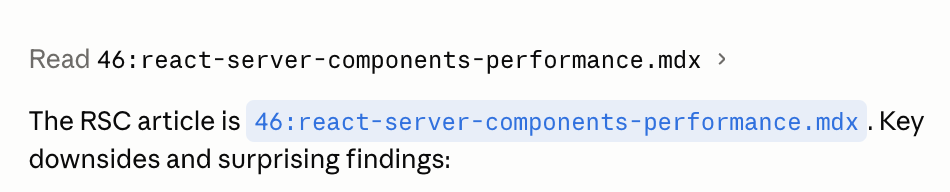
This is Claude, being the clever AI helper, calling what is known as "Tools" to extract only the article it needs. We'll see exactly how this happens in a second. But first, what are those tools?
What are Tools
Tools are just scripts that a model like Opus can access via a harness like Claude. Somewhere deep in the Claude app's implementation, there is a script called "Read" that can read the contents of files on disk.
How it works is a fascinating journey into the creative hacking with sticks and duct tape that powers today's AI revolution.
How AI Knows Which Tools Are Available
First of all, how does AI know which tools/scripts are available? Exactly the same as with all the other information it "remembers": we tell it explicitly in the system prompt.
You are a helpful assistant. You have access to the following tools:

## readArticle - reads an article from the file system and returns its content.

**Parameters:**
- `slug` (string, required) — the slug of the article to read.
Here, I just registered a tool called readArticle that accepts a slug parameter and returns the article's content. Every plugin, every skill, every MCP you install in your workflow ends up as just a short text description.
I hope a red warning light in your brain started blinking just about now, while you're remembering how many of those you installed recently. Because yes, all of them will end up in Context. All of them will be sent back and forth with every message, slowly eating away tokens and potentially confusing the AI. Not to mention all the system tools and prompts Claude has just to keep itself sane.
Open your Claude Code Context summary right now. What does it show? Mine is like this 😬
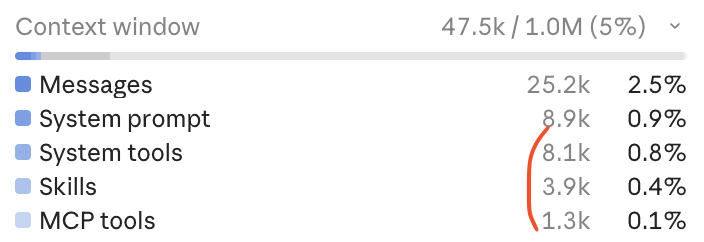
Time to do some cleaning!
How AI Calls the Tools
Okay, the tool is registered, time to use it. But how exactly is the AI able to do that? It can't even remember my name without my help, yet it's somehow able to reach out from its nest on the internet and call any scripts on my laptop at will?
Of course not. Same as it doesn't have any memory, it doesn't have any ability to access anything. You know how it happens when I want AI to call my readArticle tool?
I send it a message: "Please grab the React Server Components article and answer the following question: ..." and it responds with: "Nah, do it yourself". Almost not joking 🙃.
When I send that message, with the information about the readArticle tool injected into the System Prompt, the AI, instead of a usual text, will return the following:
- The "normal" text with a reason why it wants to trigger a tool or two. You've seen it plenty of times, fillers like "Let me investigate the issue first".
- A list of tools and the parameters it expects. In my case, it's the
readArticletool and thereact-server-componentsvalue for theslug. - And finally, some indication that the model expects something from you in return. In the case of Anthropic API, it will be
stop_reasonin the model's response with the valuetool_use.
{
  "role": "assistant",
  "content": [
    {
      "type": "text",
      "text": "Let me pull up the article first."
    },
    {
      "type": "tool_use",
      "name": "readArticle",
      "input": {
        "slug": "react-server-components"
      }
    }
  ],
  "stop_reason": "tool_use",
}
Now it's up to me as a developer: I need to track the stop_reason and understand that it's tool_use. Then, I need to iterate over the content array, extract all the tool names like readArticle, and then actually trigger those tools myself. I'm confused, who's working for whom here?
for (const block of response.content) {
  if (block.type === "tool_use" && block.name === "readArticle") {
    const result = await readArticle(block.input.slug);
    // ... send result back to the model
  }
}
And the actual tool is nothing more than this:
async function readArticle(slug: string) {
  return await fs.readFile(`blog/posts/${slug}.mdx`, "utf-8");
}
Now to the final step.
How AI Receives Tools' Output
I got the article's text, now what?
Send it back to the AI, of course. I need it to process it and give me the real answer. Together with the rest of the conversation, don't forget, so it can track what we discussed previously and "remember" what the question was.
// All the messages from the previous conversation are here, plus the new one
messages.push({
  role: "user",
  content: [{ type: "tool_result", content: articleText }],
});

// Send it all back, hope for stop_reason: "end_turn"
const response = await sendMessagesToAi(messages);
If I'm lucky, the AI will return stop_reason with the value end_turn this time, thus indicating that it's done for real. This is exactly what happened when I asked Claude to read the article in the experiment earlier. It showed me that the "Read" tool was executed once, and then it gave me the output.
Or, it can actually return a request for more tools if the previous data was not enough. Then I'll need to trigger more scripts, extract more data from the results, append that data to the already large Context again, and send it back to the AI.
If you've ever tried to do some "research" related task in any of the "agentic" AI, or any of the coding-related tasks, this is exactly how it happens. Back and forth, back and forth, while the user watches that progression in fascination and fantasizes about AI taking over the world.
This loop of "AI asks for tools → I trigger them → I send results back → AI "reasons" → asks for more tools → I send them..." is called "Agentic loop", and this is the foundation of any "agentic" workflow, harness, or framework. The entire potential collapse of the society as we know it is built around a while loop. Wild!
If you want to play around with the code that implements this, examples four and five in the repo for the article are your friends.
Agents and Sub-Agents
The conversation with the AI that involves tools and an agentic loop is what we know as, you guessed it, an "agent". I.e., it has its own Context, operates within an "agentic loop", and is able to independently call tools. Context + tools + agentic loop → AI agent.
Now, what will happen if instead of the readArticle tool I implement a doResearch tool that:
- Accepts a question to answer (i.e., a string) as an input.
- Has its own simplified and research-focused prompt.
- Does its own call to the AI.
- Has its own tools.
- Has its own internal loop.
It's also going to be an agent! Or a "sub-agent", since essentially it is controlled by the "main" agent. Naming is hard and not really important here: the implementation is exactly the same. And, just like with any agent, we can do pretty cool things with it.
Like what? Well, imagine I have 20 articles in my library, not 5. (Although I actually have more than 50 😉). And I ask the AI "Which articles are about React performance?". If readArticle were the only tool I have, i'd be in trouble.
The AI will have no choice but to load every single one of them into the Context, blowing token usage above 130k with just a single question and quickly falling into all the downsides of having a very large Context.
But what if I introduce a doResearch agentic tool instead? In my system prompt, I'd have something like this:
You are a helpful assistant. You have access to the following tools:

## doResearch - reads the content of the library and returns an answer to a question based on it

**Parameters:**
- `question` (string, required) — the question the research should answer.
Then the tool implementation would be this:
const doResearch = async (question) => {
	const prompt = `You're helpful researcher. You have access to the entire user's library. Read them all and answer user question using the information from the library`;

	// inside the flow and agentic loop described above
	const response = await createNewAIAgenticLoop(prompt, question);

	return response;
}
Where it accepts the question, sends it along with its own prompt to a completely isolated agentic loop, waits until it's done, and returns the result.
All those articles will stay inside the sub-agent. The main agent simply receives the answer and redirects it to the user as if it did all the hard work. The user is happy, and the main agent's Context stays lean and clean.
But this happiness comes at a cost.
The Cost of Sub-Agents
The sub-agents will eat the tokens as if there is no tomorrow. Yep, the main Context will be small. But all the internal Context of all of those sub-agents will not be. And in real life, they will have multiple iterations with lots of data and multiple tools (otherwise, there is no point in isolating it in the first place). Which means a lot, A LOT of back and forth of those huge conversations within the agentic loop.
That's why asking Claude to read thoroughly through the codebase before implementing a new feature is the fastest and easiest way to hit the spending limit.
The lean and clean Context, while being a good thing for tokens and Context rot, is a downside at the same time. Because any follow-up questions about the articles will have nothing to draw from. So at best, the LLM will attempt to do more research and reverse-engineer which articles were used for the first answer. More tokens, more chances it will get something wrong.
At worst, it will just hallucinate something plausible.
If you want to reproduce exactly this situation, remember the prompt from the first experiment:
Below is the list of articles I have in my library. Find the article about React Server Components and tell me what the downsides or surprising results are about them?

List:
... // list of articles - point to your own file system
And tweak it a bit to ask Claude to run that inside an agent:
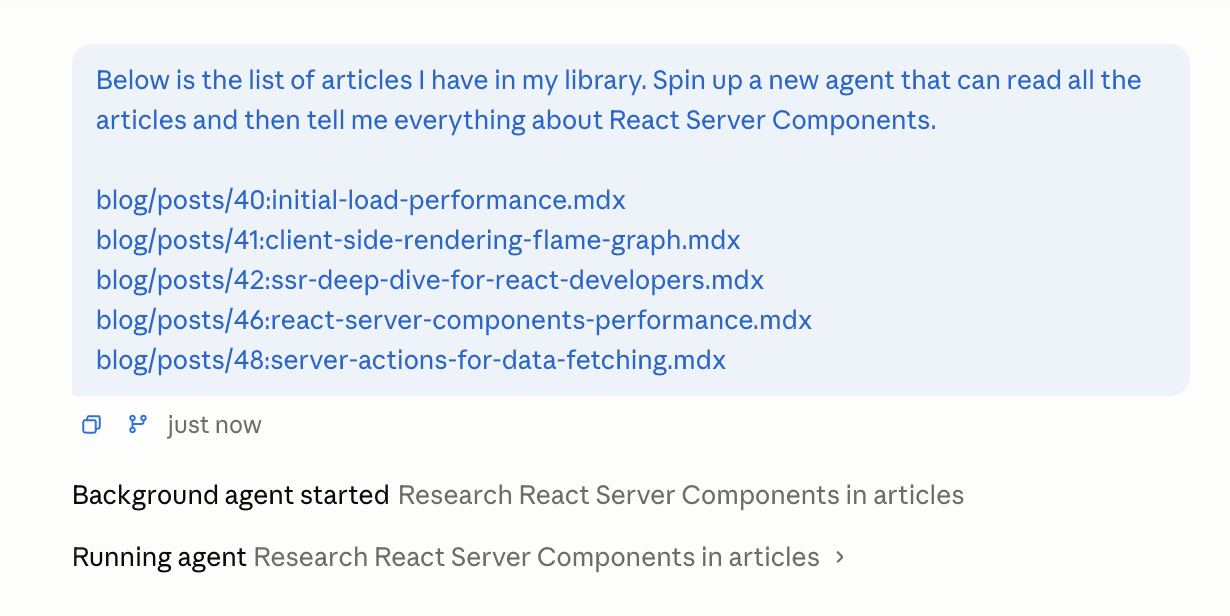
Below is the list of articles I have in my library. Spin up a new agent that can read all the articles and then tell me everything about React Server Components.

List:
... // list of articles - point to your own file system
This time, instead of the "Read" tool, you should see that it actually runs an agent:
After it's done and produced the result, the Context should stay relatively clean:
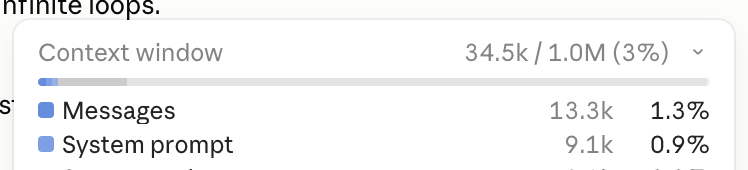
But if I ask any follow-up questions about any of the articles, it will trigger the "Read" tool again, because none of the read articles are in context.

No universally "best" solution, like always in life. Agents can keep the main Context lean, but at the cost of increased complexity in managing said Context, plus potentially even more tokens.
Homework
Skeptical about increased complexity in managing Context? Try this exercise.
Upload 20 articles to Claude via file upload, to force it to have them all in Context, and ask it to summarise each of them in two paragraphs.
Then save the same articles to the filesystem somewhere, and ask Claude again to summarise each in two paragraphs, spinning up an agent for each summarisation. The agent should do the summary and return only the result.
Keen to hear how it went for you 😉 Because, of course, it's not going to be as simple as "Agents did much better".
In my case, the first time I tried it, the "Context" version was much, much better. Only when I clicked on the agent's run results (Claude allows you to see it) did it become obvious why: the agent returned a good summary with lots of details, but the main agent summarised it again for some reason. As a result, I was comparing article summaries with summaries of summaries. Of course, there was a double degradation in quality in the second version.
To solve this, I had to explicitly say "The main agent should assemble those summaries AS-IS, without any changes". This produced much better summaries, but agents still performed much worse. Each of their summaries was more or less identical in structure, starting with "This article explains" or "This article explores", and overall lacked detail and read like big marketing fluff.
I had to strengthen the prompt to have "The summary should be as detailed and as specific as possible" to fix this. This, finally, produced much better results for agents - the summaries read much more detailed and to the point. And the hallucinations in those were pretty minor and less than half of what the Context version produced.
Hope this was helpful, and agents and tools are not some black magic anymore. Understanding what exactly they are and how they work is very useful in understanding all the new tools and innovations popping up daily.
Everyone is talking about OpenClaw and how miraculous it is? Tools + agents + loops + clever system prompt. Claude Cowork blew your mind recently? Tools + agents + loops + clever system prompt. Karpathy's autoresearch feels like a next-level black magic? Tools + agents + loops + clever system prompt.
After digging into it for a while, the most fun comes from trying to decipher which tools and system prompts were used to create yet another magical solution that takes over the world. I'm looking at something like Claude Design and mentally building a map of what kind of tools it possibly can have inside connected by what kind of prompt 😅